Run Ribo-Seq Pipeline
Pipeline to run Ribo-Seq analysis from sequences to UTR and CDS counts and MACS peaks to determine ribosome enrichment regions.
Analysis Setup
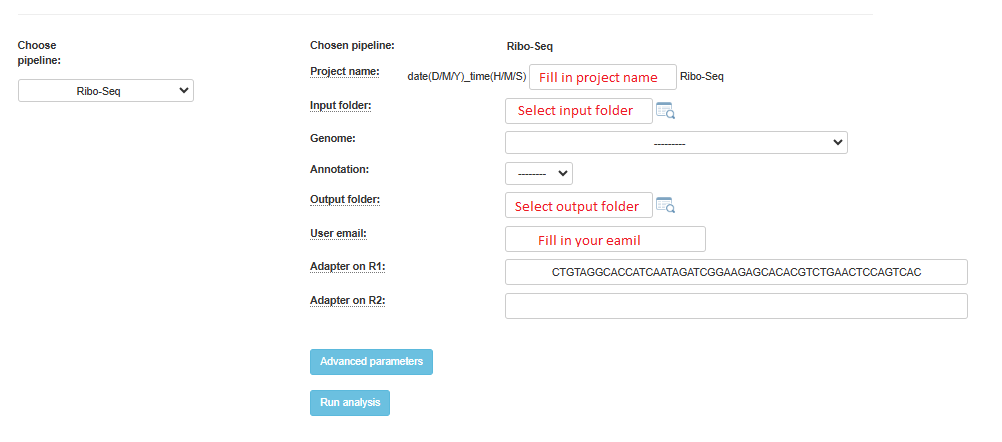
In the input folder field, Browse within your directory structure and use the Select button the root folder for analysis. Note that if you wish to go up one level (or more) click on the desired folder level using the path at the top of the window.
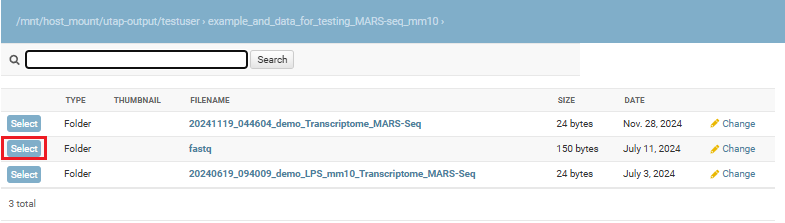
Input folder names must conform to the correct format as previously described. If there is a problem with the folder you selected, first resolve the error and then retry, selecting the updated folder.
If you wish the output folder to be different from the one automatically filled in (based on the selected input folder), just select the desired output folder.
Fill in the project name, then select the genome and annotation.
All of the steps of the pipeline (mapping, HTSeq etc.) will be run on all of the samples.
Finally, click on the “Run analysis” button.
At the end of the run, an email will be sent reporting analysis completion.